Page 1 of 5
Bug 48: (Xinux) Missing UI Elements upon Login
Posted: Sat Nov 22, 2014 10:29 am
by Cyrcle
I sent in a bug report, but didn't see where John had posted the bug to the forum yet, but basically I am missing UI elements when I log in. Using /reloadui fixes it. John had me send in a bug report.
Also once, I couldn't even see John himself. Screenshots below.
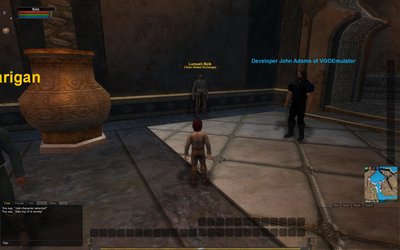
- How my UI shows upon login (every time). Was normal before.
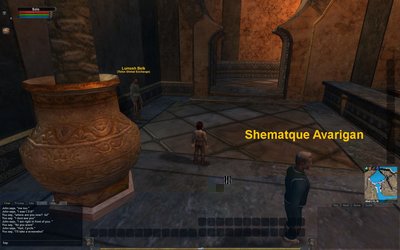
- Crashed to character select. Loaded back in but John was not visible but was there speaking with me.
Edit: Bug report was this one:
http://vgoemulator.net/index.php?p=bugs&id=48
Also note, I selected "User Interface (Default)" for the category ingame but is showing as "VGClient / Sound Effects: Music" on the list of recently submitted bugs.
Bug 48: (John told me to send in repor...
Posted: Sat Nov 22, 2014 12:35 pm
by BugTracker
Bug ID       : 48 - (John told me to send in repor...
Bug Date     : 2014/11/22 09:59:52
Assigned To  : Xinux
Priority     : Low

Category     : VGClient
Sub-Category : User Interface: (Default)
Severity     : Minor (e.g. Cosmetic)
Reproducible : Some of the time
Details:
(John told me to send in report)

This is a common issue with the game during live.
Upon loading into the game, I went to Telon Global Exchange to test it out. I noticed the Rarity drop down box was not showing. I asked John if intentional. It is not. I did a /reloadui and the problem was solved.
Originated From World: New Telon (1)
Chunk                : Khal (85)
Location             : -6614 -52722 1514
Re: Missing UI Elements upon Login
Posted: Sat Nov 22, 2014 12:37 pm
by John Adams
Assigned to Xinux/Zippy initially just to check if there's some data missing in the packet that could cause the UI element to vanish.
Re: Missing UI Elements upon Login
Posted: Sun Nov 23, 2014 7:55 am
by rottstein
I logged into New Telon for the first time myself last week and I had the same issue. I am not positive I have the correct version of VG so I didnt report any bugs.
Another thing I noticed that was odd is I would occasionally get a message that I had removed someone ability to drag my corpse. This happened every time I closed a window from an NPC and on occasion as I ran around.
I attributed this to having the wrong client version. I am not sure how to find out which version I have but the files have a date of sometime around Oct 2013.
Re: Missing UI Elements upon Login
Posted: Sun Nov 23, 2014 5:34 pm
by John Adams
There is no real "wrong client version" if you have anything dated after Aug 2013 for the VGClient.exe.
Re: Missing UI Elements upon Login
Posted: Sun Nov 23, 2014 9:49 pm
by Cyrcle
The exact version I am running is 1.324.1.139565 as seen from when I minimize and mouse over the Vanguard icon. Assuming that's the version anyways.
Logging in with no UI elements
Posted: Thu Aug 06, 2015 8:16 pm
by shargash
Three times recently I have logged in and had no UI elements, just the view of the world. Keys that are mapped to actions in user.ini (e.g. movement arrows, jump) work, but nothing else appears to. That means I can run around the world but have limited interactions. Here is a screenshot of what I see in the client. In this case I was running to the chunk line at the north edge of Tursh Village.
After I chunk, I get some UI elements, but they are wrong.
When I camp and come back, everything seems OK.
However, after this last ss, I tried to .rift to Tursh. I wound up in the center of the chunk I was in (Oceanwatch, I think). I was stuck. I could use the .move command, but I could not use keyboard arrows or mouse to actually move the character. When I tried to chunk back to Tursh with .rift, nothing happened. I was able to .rift to Khal, and then back to Tursh. Everything seemed fine after that.
This is something new. I know of at least one other player to have experienced this, because they asked me about it in chat.
I /bugged this the first time I saw it. I've been trying to get a video of it since then, and I was finally able to do that. The ss's above are taken from the video. I'd post the video, but it is 317mb.
Re: Logging in with no UI elements
Posted: Thu Aug 06, 2015 10:09 pm
by Moldew
Not 100% sure, I'm sure Xinux can answer, but I think that's a client problem. Maybe video related? I get that once in a while, even happened on live. If you move your mouse around a bit the UI will start to reappear, or you can do a /flush.
Re: Logging in with no UI elements
Posted: Thu Aug 06, 2015 10:57 pm
by shargash
I moved the mouse around, and did a /flush, to no avail. You'll notice that the UI elements are incomplete after I chunk. My suspicion is that the client is waiting for the server to send abilities, or something like that, and they never arrive. The two macros I created and have on the hotkey bar (1 & =) load, but the abilities that are on the hotbar do not load. Also, the character name and class do not load, as you can see from the character name "Solo" and the lack of a class graphic on the character window.
Re: Logging in with no UI elements
Posted: Thu Aug 06, 2015 11:31 pm
by Moldew
Ah, well something else then. :/